
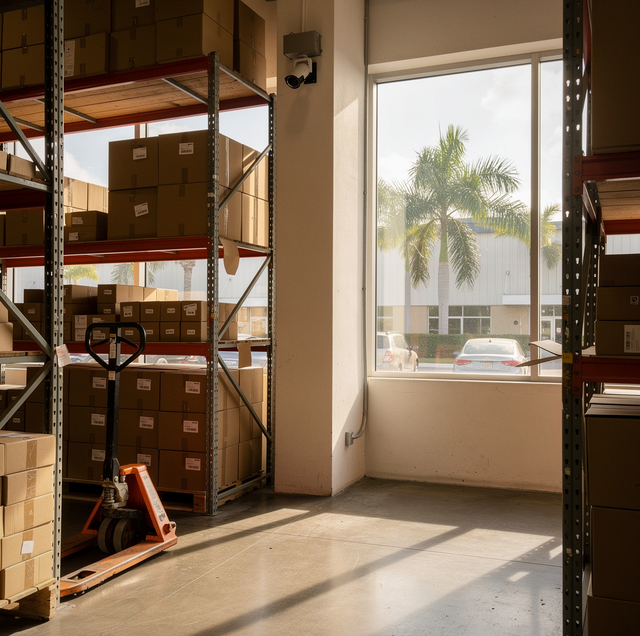
A warehouse quote that lists "24/7 surveillance" as a feature does not tell you much on its own. The phrase can mean a handful of cameras pointed at the front door, or a coordinated system covering every dock, aisle, and entry point with footage a warehouse can pull on request when something goes wrong. Choosing a storage partner means knowing the difference, and knowing what a camera system is built to do versus what it was never meant to do at all. Set side by side, what a camera system covers and what it leaves to other parts of a warehouse look like this.
| Surveillance covers | It doesn't replace |
|---|---|
| Theft deterrence at entry points and storage zones | Climate control for temperature- or humidity-sensitive goods |
| Recorded evidence of who moved a pallet, and when | Insurance coverage for loss or damage |
| Access logging tied to specific doors and zones | Inventory counts and record-to-shelf reconciliation |
| Condition checks at receiving and release | Intrusion alarm response |
How Monitoring Works Across Docks, Aisles, and Entry Points
A camera system earns its coverage by where it points, not by how many units are mounted on the wall. Dock doors are where goods change hands, so fixed cameras are aimed along the trailer line there, wide enough to capture a pallet moving from truck to floor. Aisle cameras cover the racks themselves, positioned at intersections and choke points rather than down every single lane, since a person or a lift truck has to pass through those junctions to reach any bin. Entry and exit points, including employee doors and any gate a vehicle passes through, get their own coverage separate from the general floor, because that is where a shift starts and ends and where a visitor passes through.
A system can record continuously to an on-site recorder, with motion-triggered alerts layered on top so an unusual event- someone in an aisle after hours, a door propped open- gets flagged rather than buried in hours of ordinary footage.
Continuous recording: the camera writes every frame to storage regardless of activity, which is what makes a full timeline available later.
Motion-triggered alerts: a separate layer that monitors the same feed for movement and sends a notification, intended for speed of response, not for what gets saved.
Ask for a still frame pulled from the camera covering your specific zone, and check that a face or badge in that frame is legible at that distance and angle.
What Recorded Footage Settles in a Damage or Shortage Dispute
Footage earns its keep when two parties disagree about what a shipment went through. A pallet arrives at the dock, a driver signs for a count, and three days later a customer reports a shortage. Without a timestamped record, that dispute comes down to whose memory sounds more confident. With one, a warehouse can pull the exact window around that pallet's arrival and departure and show what left the dock and when.
What the footage settles is narrower than it sounds. A camera shows presence and movement: who was near a load, whether a door opened, how long a pallet sat before it moved again. Matching that movement against the specific unit count that went missing is a job for inventory auditing, not the camera feed itself, and a warehouse that runs both together gets a fuller picture than either one gives alone. Footage shows a case moving, not what was in it: it can confirm that a case left the dock intact, but it cannot show how many units were packed inside it at any point. When a pallet turns up damaged at receiving rather than missing, ask whether dock footage has been pulled and checked against the handling record, so a handling cause can be distinguished from a carrier cause.
Access Control and Who Can Reach Your Goods
A camera answers what happened. An access control system answers who was allowed to be there at all. The two work together but are not the same system: a badge, fob, or keypad code opens a specific door or gate, and each use records a line in a log with a name, a door, and a time. Pair that log against the video from the same door and a warehouse can confirm not just that someone entered, but that the credential used matches the person the camera shows walking through.
Zoning is the piece that changes for stored goods specifically: a specific rack, cage, or room holding a client's goods can be narrowed to a short list of names, rather than the broader access general warehouse floor traffic gets.
How It Pairs with Inventory Auditing
Surveillance and inventory auditing solve different halves of the same problem: one shows movement, the other verifies quantity. A cycle count that flags a discrepancy in a specific bin is more useful once a warehouse can check whether that bin had any unscheduled access during the window the discrepancy points to, with the surveillance record doing what auditing cannot do on its own. Neither replaces the other, and a warehouse that treats camera footage as its inventory system still won't have a reconciled shelf count from it.
Questions to Ask a Warehouse About Its Coverage
A few direct questions separate a real surveillance program from a bullet point on a sales page. Ask how long footage is kept before it cycles, since a system that overwrites too soon may not have anything left by the time a shortage is noticed. Ask whether cameras cover the specific zone where your goods will be stored, not just the building's main entrance and the front office. Ask who can pull footage on request and how long that takes, since a policy that requires a multi-day approval process is not much help when a customer wants an answer today. Ask whether the footage is kept only on a recorder inside the building or also copied elsewhere, since a recorder in the same building only captures what happens inside that building. And ask what happens to coverage during a power interruption: a system without backup power leaves a gap in the record for as long as the power is out.
Frequently Asked Questions
On a system that records to a loop, the oldest footage is overwritten once the drive fills to make room for new recordings, with no one choosing what goes first. A clip only survives past that point if someone flags and copies it off the loop before its turn comes up, which is why a shortage or damage report needs to be raised promptly rather than after the loop has already cycled.
Not the camera. That answer comes from the paperwork made at pack-out: a sealed-case count taken before the case closed, the seal number on the packing slip if the case carries a numbered seal, and a photo of the contents before the lid went on. Those records were made before anyone knew a unit would go missing, which is what gives them weight when a shortage is disputed.
A system can run a background health check on each camera, watching for a lost signal, a blank or obstructed frame, or a device that stops responding, and flag that camera rather than waiting for someone to notice a gap in the footage later. That alert is what gets a dead camera fixed when it fails, rather than leaving a blind spot nobody knew about until it mattered.
No, and the difference matters for what happens after hours. A camera records and can trigger a notification, but recording alone does not summon anyone. A monitored intrusion alarm, wired to door contacts or motion sensors and connected to a service that dispatches a response, is a separate layer that some facilities run alongside their cameras and some do not, so it is worth asking about specifically rather than assuming it comes bundled with recording.
A wide shot covering an entire aisle is good for showing that movement occurred and roughly where, but a face or a badge is too small in the same frame to identify who it was. Cameras aimed to confirm identity are placed lower and tighter, at a doorway or a checkpoint someone has to pass through directly, rather than mounted high and wide, as an activity camera is.
Yes. Timestamped dock footage showing a trailer backing in and later pulling out can be checked against the scheduled appointment window for that load, which is a separate record in the surveillance system. That comparison is useful for a shipper trying to understand why a delivery ran long, since the footage pins down the actual arrival and departure rather than relying on a driver's recollection of the day.
Tour the climate-controlled storage your pallets would occupy — the team walks you through that zone's aisle, the dock door that handles its loads and the camera coverage on both. Delivery and Warehousing Solutions serves West Palm Beach, Palm Beach Gardens, and Jupiter. Call (561) 842-0044.